
You probably use a phone every day to message friends, watch videos, and scroll social media, so a computer shouldn’t feel that different. Yet when a job application asks for “basic computer skills” or a client sends a spreadsheet, many people realize there are gaps they never noticed. In this guide, we’ll walk you through the complete checklist of essential computer skills for 2026, explain each one in plain language, and show you exactly how to learn them for free.
Key Takeaways
- Basic computer skills are the foundational abilities needed to operate a computer, manage files, browse the internet, use email, work with common software, and stay safe online.
- Core skill categories include hardware and operating system use, file management, internet and email, productivity software, typing, online security, and basic troubleshooting.
- Employers across nearly every industry now expect digital literacy, so basic computer skills directly improve job prospects and earning potential.
- Online safety habits such as strong unique passwords, two-factor authentication, and spotting phishing emails are as essential as knowing how to use software.
- Free platforms like GCFGlobal, Microsoft Learn, and Google Applied Digital Skills teach every basic computer skill at no cost.
- Consistent practice of 20–30 minutes per day for about a month is enough for most beginners to feel confident with everyday computer tasks.
- Basic computer skills are the launchpad for higher-value skills such as advanced spreadsheets, graphic design, freelancing, and remote work.
What Are Basic Computer Skills?
Basic computer skills are the foundational abilities needed to operate a computer, manage files and folders, use the internet and email, work with common software like word processors and spreadsheets, and protect yourself online. They are the minimum skills you need to complete everyday tasks without asking someone else for help.
In simple terms, basic skills cover using a computer, not building or programming one. For example, saving a CV as a PDF and emailing it to an employer is a basic skill, while writing code for a website is an advanced one.
At the same time, basic computer skills sit inside a bigger idea called digital literacy. Digital literacy is the ability to find, evaluate, create, and communicate information using digital technologies. Learning computer basics is the first and most practical step toward it.
| Skill Level | What You Can Do | Example Task |
|---|---|---|
| Basic | Use the operating system, files, email, browser, and office apps | Write a letter in Word and email it as an attachment |
| Intermediate | Use formulas, design tools, cloud collaboration | Build a monthly budget in Excel with SUM and charts |
| Advanced | Program, manage networks, automate workflows | Write a script that backs up files automatically |
Why Are Basic Computer Skills Important in 2026?
Basic computer skills are important because almost every job, service, and income opportunity now runs through a computer or the internet. Without them, you can miss out on employment, education, and online earning.
First, consider the job market. 92% of jobs in the United States require digital skills . Even roles in retail, healthcare, and logistics now involve scheduling software, email, and digital forms.
Moreover, many people still lack these skills. Only about 56% of people aged 16–74 in the European Union had at least basic digital skills . This gap means anyone who learns the basics gains a real advantage.
In addition, computer skills open doors to online income. For example, freelance data entry, virtual assistance, and content writing all start with typing, email, and Google Docs. You can explore these paths in our guide to Digital skills, or read freelancing beginner’s guide.
Plus, everyday life is going digital. Banking, government services, school portals, and doctor appointments increasingly happen online, so these skills also give you independence.
What Basic Computer Skills Do Employers Expect?
Employers expect you to handle the operating system, files, internet, email, office software, typing, and online safety without supervision. Let’s explore each category in detail.
Operating System and Hardware Basics
The operating system (OS) is the main software that runs your computer, such as Windows or macOS. First, you should be able to turn the device on and off safely, use a mouse or touchpad, and connect accessories like printers and USB drives.
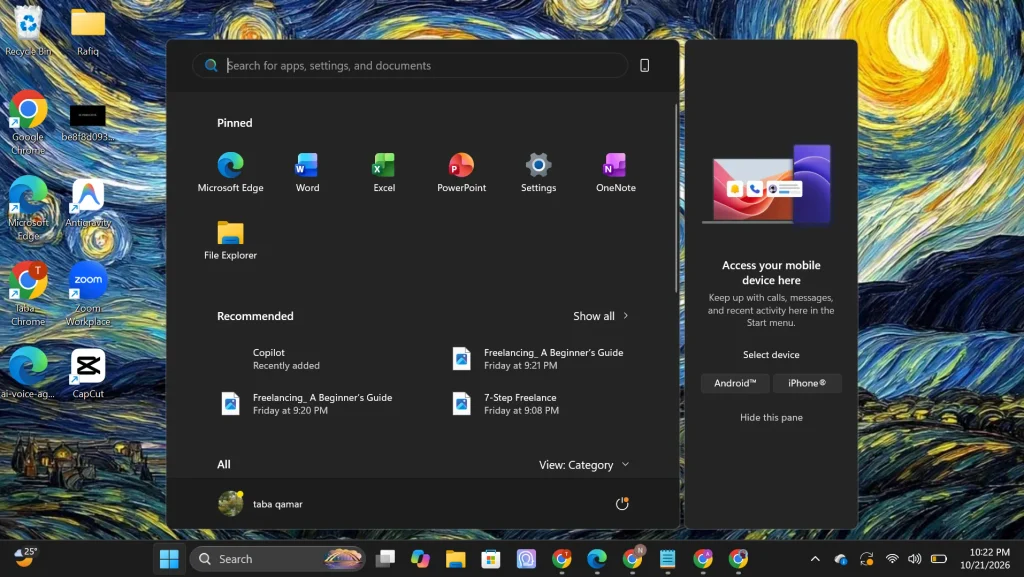
Next, learn to find your way around the desktop. For example, on Windows you open apps from the Start menu and switch between them using the taskbar, while on a Mac you use the Dock and Finder. You should also know how to change basic settings like brightness, volume, and Wi-Fi.
How Do You Manage Files and Folders on a Computer?
File management means creating, naming, saving, moving, copying, and deleting files, and organizing them into folders so you can find them later. It is one of the most underrated computer skills for jobs.
For example, a tidy structure like Documents > Job Applications > 2026 lets you find your CV in seconds. You should also recognize common file types: .docx (Word document), .pdf (portable document), .jpg or .png (images), and .xlsx (spreadsheet). A file extension is the short code after the dot that tells the computer which app opens the file.
In addition, modern file management includes cloud storage, which saves your files on online servers so you can open them from any device. Google Drive and OneDrive both offer free plans.
Internet, Email, and Video Call Skills
A web browser is the app you use to visit websites, such as Chrome, Edge, or Safari. First, practice opening tabs, bookmarking useful pages, and searching effectively. For example, putting a phrase in quotation marks, like “data entry jobs”, tells Google to find that exact phrase.
Next, master email. You should be able to write, reply, forward, attach files, and spot spam.
Finally, learn video calls. Zoom, Google Meet, and Microsoft Teams are now standard for interviews and client meetings. Practice joining a call, muting your microphone, and sharing your screen before you need it.
Which Microsoft Office Skills Should Every Beginner Learn?
Every beginner should learn to create documents, simple spreadsheets, and basic presentations using Microsoft Office or free alternatives like Google Docs, Sheets, and Slides. These three tools cover most office tasks.
First, in Word or Google Docs, learn to format text, add headings, insert images, check spelling, and export as PDF. For example, a cover letter written in Docs can be downloaded as a PDF in two clicks.
Second, in Excel or Google Sheets, learn to enter data, sort columns, and use simple formulas like =SUM() and =AVERAGE().
Third, in PowerPoint or Google Slides, learn to create slides, choose a layout, and add images. By practicing all three, you can handle most school and workplace assignments.
What Is a Good Typing Speed for Beginners?
A typing speed of 40 words per minute is generally considered a good benchmark for everyday computer work, while beginners typically start between 20 and 30 words per minute. Faster, accurate typing saves hours every week.
For example, touch typing means typing without looking at the keyboard by keeping your fingers on the “home row” (A-S-D-F and J-K-L-;). Free sites like typing.com give daily drills.
Which Keyboard Shortcuts Should Every Computer User Know?
Keyboard shortcuts are key combinations that perform common actions instantly. On a Mac, replace Ctrl with Cmd.
- Ctrl + C — Copy
- Ctrl + V — Paste
- Ctrl + X — Cut
- Ctrl + Z — Undo
- Ctrl + S — Save
- Ctrl + F — Find text on a page
How Can Beginners Stay Safe Online?
Beginners can stay safe online by using strong unique passwords, turning on two-factor authentication, updating software, and learning to spot phishing scams. Security is a core skill, not an optional extra.
First, understand why it matters. 68% of data breaches involved a human element, such as falling for phishing or making an error. In other words, your habits are your strongest defense.
Two-factor authentication (2FA) adds a second check, like a code on your phone, when you log in. Microsoft reports that multi-factor authentication can block over 99.9% of account compromise attacks — Source: Microsoft, 2019. A free password manager like Bitwarden can also create and store strong passwords for you.
In addition, watch for red flags: urgent messages, unknown links, and requests for payment or passwords. Fake “earn money online” offers are especially common.
How Can You Fix Common Computer Problems Yourself?
You can fix most common computer problems by restarting the device, checking connections, closing frozen programs, and freeing up storage space. These simple steps solve the majority of everyday issues.
For example, if an app freezes on Windows, press Ctrl + Shift + Esc to open Task Manager and end the task; on a Mac, press Cmd + Option + Esc to Force Quit. If Wi-Fi drops, turn Wi-Fi off and on, then restart the router. If the computer is slow, delete unused files and uninstall apps you no longer need.
Should Beginners Learn to Use AI Tools?
Yes, using AI tools responsibly is now a basic computer skill in 2026. Tools like ChatGPT, Gemini, and Claude can help you draft emails, summarize documents, and explain confusing settings.
That being said, always check AI answers for mistakes and never paste passwords, ID numbers, or private client data into a chatbot.
How Do You Learn Basic Computer Skills for Free?
You can learn basic computer skills for free through platforms like GCFGlobal, Microsoft Learn, Google Applied Digital Skills, and typing.com. Each offers beginner-friendly lessons you can take at your own pace.
| Free Resource | Best For | Certificate? |
|---|---|---|
| GCFGlobal | Absolute beginners, computer basics, Office | No |
| Microsoft Learn | Windows, Word, Excel, Teams | Badges available |
| Google Applied Digital Skills | Docs, Sheets, job readiness | Yes (free) |
| typing.com | Touch typing practice | Yes (free) |
| Coursera / edX (audit mode) | Structured courses | Paid certificate |
How Should You List Basic Computer Skills on a Resume?
You should list specific tools and tasks instead of writing only “basic computer skills.” For example, write “Microsoft Word and Excel (formulas, sorting), Google Workspace, email management, typing 45 WPM”. Specific skills pass applicant tracking systems more easily.
What’s Next? Your 30-Day Basic Computer Skills Plan
The fastest way to build computer skills is a structured plan of 20–30 minutes of daily practice. Learning basic computer skills involves practicing core tasks in a set order: navigating the operating system, organizing files, browsing and searching the web, sending emails, using office software, and adopting online safety habits.
- Days 1–7: Practice the desktop, settings, and file management.
- Days 8–14: Practice browsing, searching, email, and video calls.
- Days 15–21: Practice Docs, Sheets, and Slides with real tasks.
- Days 22–30: Practice typing daily, set up 2FA, and try troubleshooting.
After that, level up with intermediate skills such as advanced Excel or design.
Conclusion
Basic computer skills are the foundation for jobs, online income, and everyday independence in 2026. You now know the core categories: operating system use, files, internet and email, office software, typing, security, troubleshooting, and AI tools.
Remember, every expert started as a beginner. By practicing a little each day, you can go from unsure to confident in about a month.
Disclaimer: This article was initially drafted using AI assistance. However, the content has undergone thorough revisions, editing, and fact-checking by human editors and subject matter experts to ensure accuracy.
