
I started affiliate marketing on Pinterest with $0. No ads, no paid tools, no website hosting.
For the first three months, that’s also what I earned. Zero.
My second try brought in about $300 over three months. Same niche, same free setup. The difference was what I’d learned from making it wrong the first time. This post is the beginner version of that setup, step by step, with the mistakes I’d skip if I started again.
Can you really start Pinterest affiliate marketing with $0?
Yes. A Pinterest business account is free, and the same is true for Amazon Associates. You create the pin, put your affiliate link as the destination of the pin, and take a commission when visitors purchase through your pin.
The price you pay is your time. Pins take a few weeks to take off, trends are fast-changing, and Amazon provides new affiliates with a deadline for their first sales. If you’re looking for quick money, the slow months will get you to give it up.
What happened when I tried this
I picked one niche: women’s fashion, mostly dress outfits. I pinned outfits on Pinterest and linked each pin straight to the Amazon product. I also put links on a free Blogger blog.
The blog never brought me a sale. Pinterest brought the views, but in three months I didn’t make the three sales Amazon wanted, and they closed my Associates account.
On my second attempt, I focused only on Pinterest. Over three months, that earned me about $300. That isn’t typical, and I’m not promising you the same. Plenty of people pin for months and earn less.
Last month I started a brand-new Pinterest account. It reached 19,000 views in its first month and made zero sales. So even now, I’m still learning which pins sell. I wrote about that in detail in what I pinned for fashion and what actually sold.
Step 1: Join affiliate program
I use Amazon Associates because it’s free, most US shoppers already trust Amazon, and it has products for every niche.
Before you apply, know the rule that caught me. After you apply, you have 180 days to refer three qualifying sales. If you don’t, Amazon can withdraw your application. Amazon explain this on its Associates help page about account dormancy. Rules like this change, so read the current page before you start.
My tips: Do not apply until you have created your Pinterest account and created your first pins. That way, the 180 days begin when you’re ready to get clicks, not when you’re still selecting a profile photo.
Step 2: Pick a narrow niche
Newbies enjoy pinning anything: kitchen items, phone cases, and so on. I’d stay narrow.
I selected women’s dress outfit. With one niche, you’re the one who’s sending your boards, pins and Amazon links all at the same customer type. Pinterest will learn more about who to target your pins to and you’ll learn to pick up on what is selling.
A good starting niche is one which people purchase without thinking for days. A $30 dress will be easier to sell than a $900 laptop.
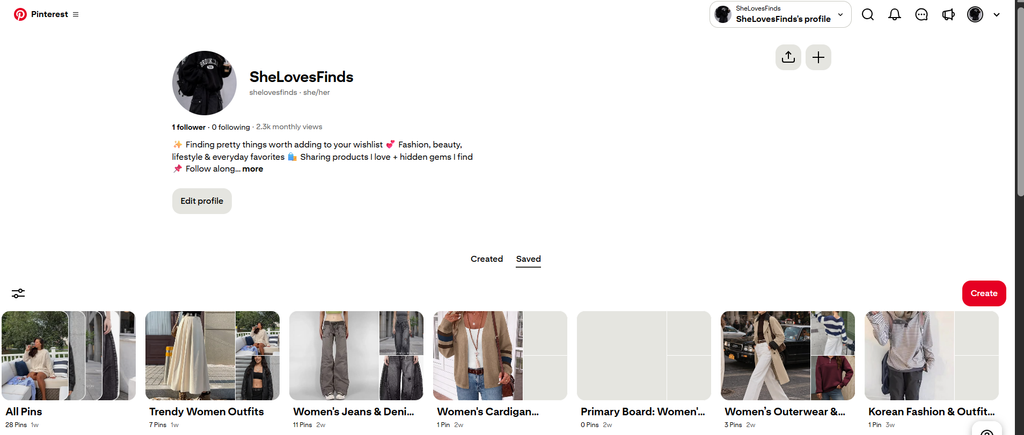
Step 3: Set up a free Pinterest business account
Make a Pinterest business account instead of using your personal one. It’s free, and it gives you Pinterest analytics, which you’ll need later to see what’s working.
Keep the setup simple:
- Use a profile name that says what you pin, like a short brand name and your niche.
- Write a bio that tells people what they’ll find, in plain words.
- Create a few boards around how people search, such as “Fall wedding guest dresses” or “Summer vacation outfits.”
Step 4: Make pins people actually search for
Pinterest is not really a social feed, but rather a search engine. They search for answers to their inquiries, such as “what to wear to a fall wedding” or “beach vacation dress. Your pin title and description should be the same words.
Use the name that a shopper might use to find it rather than how Amazon refers to it. A product description may be pinned as “Easy summer midi dress for a beach vacation” for a product named “Women’s V-Neck Short Sleeve Flowy Midi Dress”.
Next, focus on new trends. The biggest thing I noticed is that a pin with a low view count would sometimes sell and a pin with thousands of views sold nothing. That usually meant whether or not that outfit was what women wanted at that time.
Step 5: Add your link and disclose it
Put your Amazon affiliate link straight into the pin’s destination link. Don’t use a link shortener. Pinterest’s community guidelines on affiliate links ask that people can tell where a link goes, and shorteners hide that.
Every pin with an affiliate link needs a disclosure. A short line in the description works: “Affiliate link. As an Amazon Associate, I earn from qualifying purchases.” The FTC expects disclosures people will actually notice. Its Endorsement Guides FAQ explains the rules in plain language.
After you publish, tap the pin yourself once to make sure it opens the right product.
Step 6: Track clicks and orders, not views
This is where I fooled myself the most.
Views look exciting. My new account’s 19,000 views felt like progress. But a view only means the pin appeared on someone’s screen, and they may have scrolled right past.
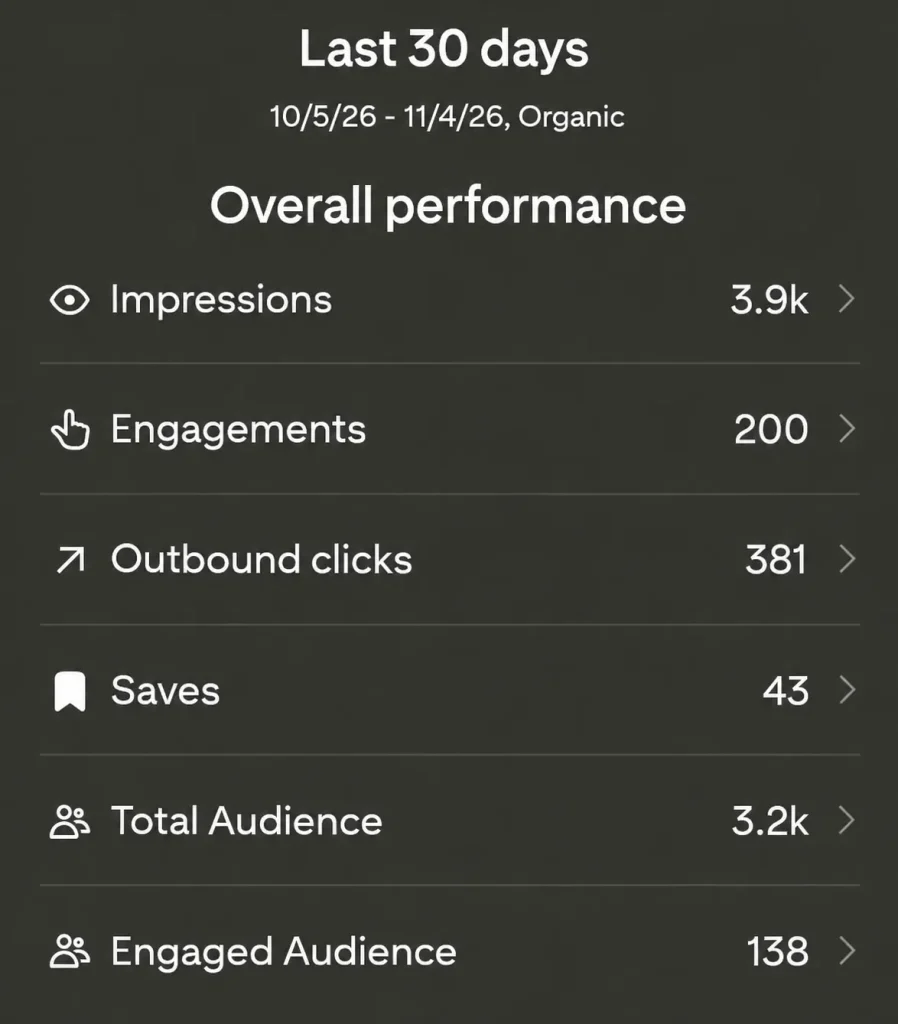
Once a week, open Pinterest analytics and sort your pins by outbound clicks. Then check your Amazon reports for orders. Those two numbers tell you what’s working.
- Lots of views, no clicks: the pin isn’t matching what people want to buy.
- Clicks but no orders: people liked the idea but not the product or the price.
- A few views and an order: that’s a pin worth making more of.
My biggest mistake
On my first attempt, I treated Amazon’s 180 days like a far-off date. I pinned when I felt like it, didn’t track anything, and assumed sales would show up once views did.
Three months went by with no sales, and Amazon closed the account. All the links in my pins stopped earning, and I had to start that part over.
If I’d checked clicks every week from the start, I would have seen much sooner that my views weren’t turning into buyers.
What I’d do if I started today
- Pick one niche and stick with it for at least three months.
- Set up a free Pinterest business account and a few boards before joining any affiliate program.
- Make a batch of pins first, then apply to Amazon Associates so the 180 days work for you.
- Write pin titles using the words shoppers type into Pinterest search.
- Put the disclosure on every pin from day one.
- Check outbound clicks and Amazon orders every week, and make more of whatever gets orders.
- Expect slow months. Mine started with three months of $0.
I’ve only done this with Amazon and fashion products. I haven’t tried other affiliate programs on Pinterest or sent pins to a blog post first before Amazon, so I can’t tell you how those compare.
If you’re still deciding whether to start at all, read my honest $0 affiliate marketing story. It covers how I got started before any of the steps in this post.
